
Vault
The environment's private Markdown knowledge base. Agents read it before they write, so drafts come back in your words.
Beta. The four Vault tools ship in the default MCP connection. The folder conventions on these pages are recommendations, not enforced structure.
A Vault is a folder of Markdown documents scoped to one
environment. Agents read it before they write, and
every edit carries the revision of the document it was based on, so two
writers cannot overwrite each other.
The Same Prompt, Twice
No Vault. "Write the intro for a comparison page against Chili Piper":
Choosing the right lead routing solution is critical for modern go-to-market teams. In this article we compare two leading platforms to help you make an informed decision.
With a Vault holding your positioning doc, three closed-won call summaries and a competitor note:
Most teams evaluating us against Chili Piper are not really comparing routing. They are asking whether they can stop paying per seat for booking, and whether the qualification decision and the calendar can live in one system. That is the comparison worth making, so we will make it directly.
Same model. The second one had your words to work from.
What Connects to the Vault
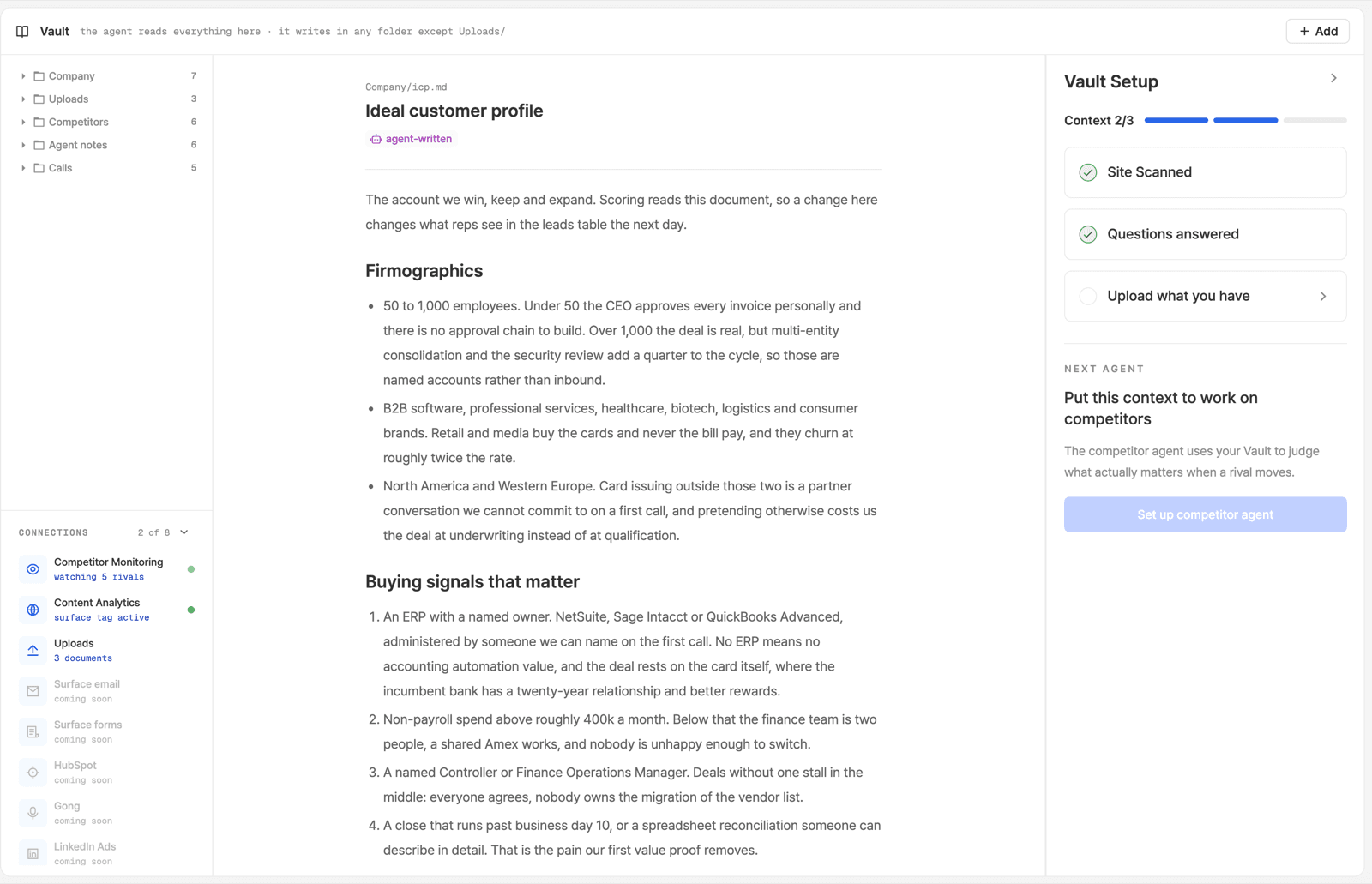
The Vault screen carries a Connections panel with eight rows. Two of them can be live, and both of them write into the Vault rather than read from it:
| Connection | Live when | What it writes |
|---|---|---|
| Competitor Monitoring | Your watchlist has at least one competitor | Competitors/<domain>/, nightly |
| Content Analytics | The Surface Tag is installed | Content Analytics/<date>.md, weekly |
The counter above the panel ("N of 8") counts those two and nothing else, so a fresh environment reads 0 of 8 and a fully set-up one reads 2 of 8.
Uploads is the third row and is not a connection: it opens the add-to-Vault dialog.
The remaining five rows read Surface email, Surface forms, HubSpot, Gong and LinkedIn Ads. All five are hardcoded as coming soon with nothing behind them, so none of them can be turned on. One narrow piece of Surface email is an exception and is already running: competitor newsletters, covered on Competitor Monitoring.
Two more readers are not listed as connections:
- SAM reads the Vault before it drafts anything, and files good answers back with Save in Vault.
- Your own agents get the four
vaultMCP tools in the default connection.
Which of Surface's other agents read the Vault, and which folders they reach for, is not documented. Ask your FDE before you build a folder specifically to feed one.
Getting Started
Create it from your website
One call, one URL. Surface reads your public site and writes the first pass: what you do, who for, how you talk.
Read what it got wrong
The crawler believes whatever your site claims. Fix the three worst ones.
Add what is not on your site
Objections, pricing rationale, the competitor take you would never publish, the phrases you refuse to use.
In the app, a Vault Setup checklist tracks its own three: site scanned, questions answered, upload what you have.
It Is Backed by Git
Every environment's Vault is a private Git repository, with a Postgres mirror the browser and the MCP tools read from. One batch of changes becomes one commit and one mirror update, which is what makes an edit atomic and why the document has history.
Two consequences worth knowing:
- The
revisionon every edit is a hash of the document you read. If it changed since, the whole call is rejected and nothing is partly applied. MIRROR_STALEis not a failure. It means the commit landed and only the read mirror lagged. Retrying on it duplicates the work. See the write contract.
Two Things Worth Knowing
It is not a chatbot knowledge base. It is source material for writing. The test of a document is "would this change how a writer phrases something", not "would a support rep send this".
Shorter beats longer. A 200-word document that says "we never use the word 'solution' and we always name the customer" beats a 40-page brand bible.
We will build your first Vault with you
Bring your positioning doc and two closed-won call recordings, and we will work through the Vault Setup checklist with you.
Ready to Get Started?
See it on your own site, or open the app and build the first form.