
Cookie Consent for the Surface Tag
Make Surface follow the choice visitors make in your cookie banner.
Surface does not show its own cookie banner. It follows the one on your site. Forms still load and accept submissions whatever the visitor chooses.
Set It Up
Turn on consent mode in the Surface Tag
Add data-consent-mode to your existing Surface Tag. The tag then tracks nobody until your banner says yes.
<script
  src="https://cdn.jsdelivr.net/gh/trysurface/scripts@latest/surface_tag.min.js"
  site-id="YOUR_SITE_ID"
  data-consent-mode>
</script>
Send the visitor's choice to Surface
Call this from your banner on every page load and whenever the visitor changes their choice, including when they reject.
window.SurfaceSetConsent({
  adTracking: marketingAccepted === true,       // Ad & Conversion Tracking
  surfaceAnalytics: analyticsAccepted === true, // Surface Analytics
  cookieTracking: cookiesAccepted === true      // Cookie Tracking
});
Send all three every time. Anything not true counts as a no.
What the Settings Mean
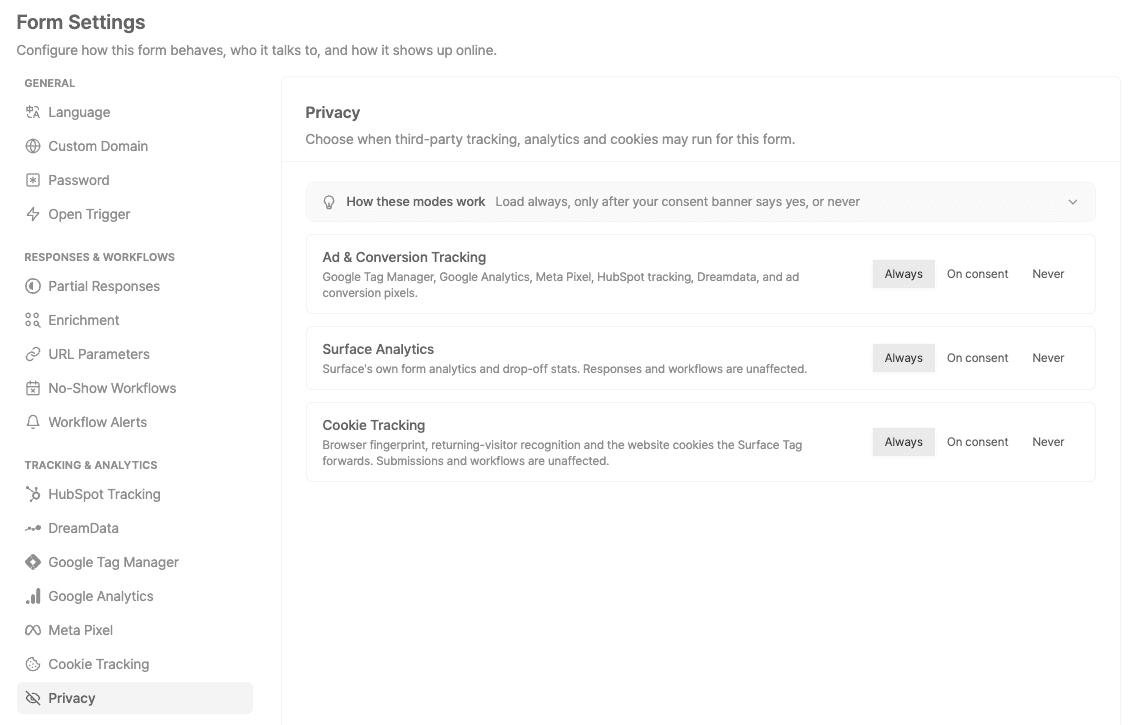
Each form's Privacy settings decide how it treats these three categories:
| Setting | What happens |
|---|---|
| Always | Tracks every visitor, whatever they choose. |
| On consent | Follows the visitor's choice in your banner. |
| Never | Never tracks. |
Before a visitor chooses, On consent holds off in the EU, EEA and UK (or when location is unknown) and tracks everyone else. To hold off everywhere, send all false until the visitor accepts.
Developer Details
›If the tag loads async or through a tag manager
Put this above the tag and your banner code, so calls made before the tag loads are queued and replayed:
<script>
  window.SurfaceTagQueue = window.SurfaceTagQueue || [];
  window.SurfaceSetConsent = window.SurfaceSetConsent || function (consent) {
    window.SurfaceTagQueue.push({ type: "consent", args: [consent] });
  };
</script>›Test it
In a private window on your live site:
- Before accepting: no
surface_journey_idorsurface_recent_visitcookies, and nosurfaceLeadDatain local storage. - Accept: tracking starts.
- Withdraw: those cookies and the stored data are cleared.
- Submit a form with tracking denied: the response and workflows still work.
Ready to Get Started?
See it on your own site, or open the app and build the first form.