
Email Input Field Trigger
Triggering via email input field submission
1. Add the HTML Form
Ensure your HTML form includes the surface-form-handler class. This class is essential for identifying the form as one that triggers the Surface Form popup. Example:
<form class="surface-form-handler">
  <input type="email" placeholder="Enter your email" required />
  <button type="submit">Submit</button>
</form>
Add the surface-form-handler class to any external form that you want to
use to trigger the Surface Form popup.
2. Surface Form Constructor
Add the following code to the app/layout.tsx file:
import Script from "next/script";

export default function RootLayout({
  children,
}: {
  children: React.ReactNode,
}) {
  return (
    <html lang="en">
      <head>
        <Script
          src="https://cdn.jsdelivr.net/gh/trysurface/scripts@latest/surface_tag.min.js"
          data-site-id="SITE_ID"
          strategy="beforeInteractive"
        />
        <Script
          strategy="afterInteractive"
          id="surface-form-script"
          data-question-id="<question_id>"
          dangerouslySetInnerHTML={{
            __html: `
              (function () {
                const surface_src = "REPLACE ME WITH FORM URL"
                const surface_embed_type = "popup"
                const target_element_class = "surface-form-button"
                const c = new SurfaceEmbed(surface_src, surface_embed_type, target_element_class)
              })();
            `,
          }}
        />
      </head>
      <body>{children}</body>
    </html>
  );
}
Using a verified custom domain? Add data-custom-domain="forms.example.com" to the Surface Tag. Follow the custom-domain setup guide before publishing the change.
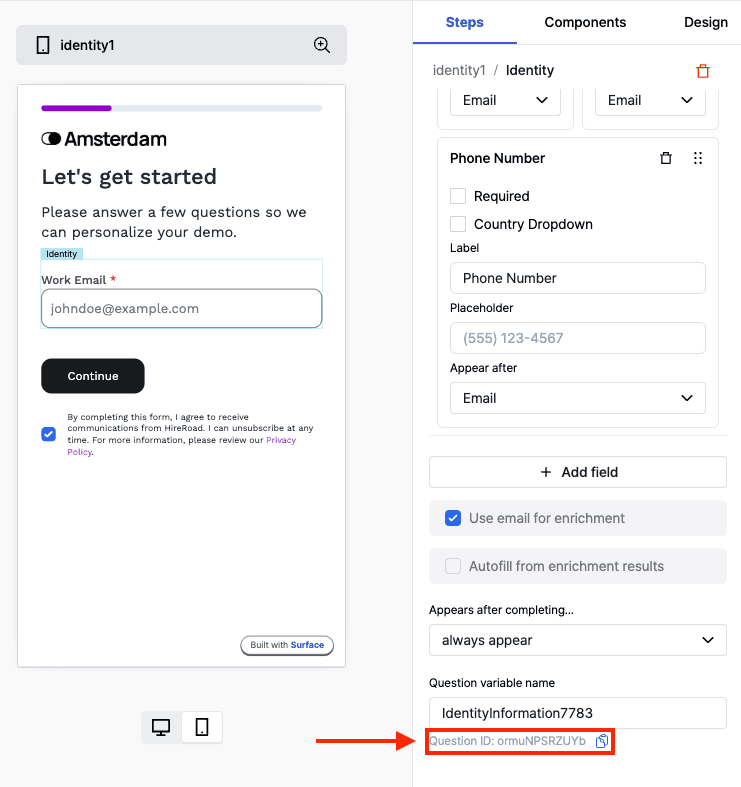
You must replace the <question_id> within data-question-id attribute and REPLACE ME WITH FORM URL with the question ID from the Surface Form Builder and the form URL respectively.
Ready to Get Started?
See it on your own site, or open the app and build the first form.